
ZonePDF for Desktop
PDF Software That Keeps Your Files on Your PC
Merge, split, compress, and convert PDF documents, all on your computer. Nothing is uploaded, so your documents stay private and there's no waiting on a connection.
Download for Windows- Files never leave your computer
- Works offline
- Registration is optional
Your files stay on this PC
Why Use the Desktop App?
Private by Design
Your PDFs are processed on your own computer and never uploaded to our servers — the safe choice for contracts, tax forms, and medical records.
No Uploads, No Waiting
Large scans and long reports don't have to travel over the internet and back. Your PC does the work, so it starts the moment you click.
Work Anywhere, Even Offline
No Wi-Fi, no problem: merge, split, and compress PDFs on a plane, on the road, or wherever the connection drops.
Desktop App or Online Tools?
Both are ZonePDF — pick the one that fits the job.
Desktop App
For Windows PCs
- Files never leave your computer
- Works offline
- No upload wait, even for large files
Online Tools
For any device with a browser
- Files upload over an encrypted connection and are deleted within a few hours
- Needs an internet connection
- Nothing to install — works in any browser, on any device
Everyday PDF Work, Kept Private
Keep Confidential Documents Off the Internet
Contracts, tax returns, HR files, and medical records shouldn't sit on someone else's server. All of the files you convert with the desktop app remain on your computer — we do not transfer them over the internet to our cloud servers.

The PDF Tools You Use Most, in One App
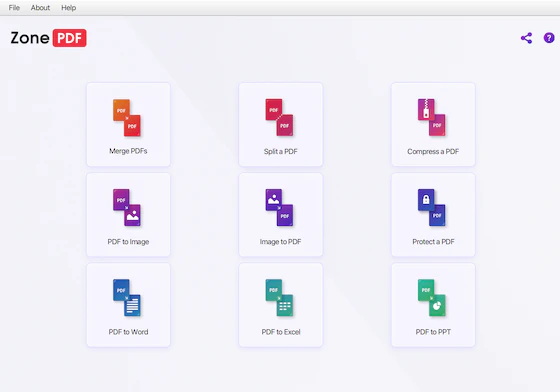
Merge and split documents, compress big files, protect PDFs with a password, and convert PDFs to Word, Excel, PowerPoint, or images — and images back to PDF.
Need to edit a PDF or ask it a question? Those tools work online, right in your browser.
See all PDF tools
Desktop App — Frequently Asked Questions
Are my files uploaded when I use the desktop app?
No. The desktop app processes your files right on your computer. We do not transfer your files over the internet to our cloud servers, so your documents stay private.
Does the desktop app work offline?
Yes. Your PC does the work, so merging, splitting, compressing, and converting don't need an internet connection. The app only goes online for things like license checks and updates.
Is there a Mac version of the desktop app?
The desktop app is currently available for Windows only. On a Mac or Chromebook, use the ZonePDF online tools in your browser — there's nothing to install.
How do I install the desktop app?
Click Download for Windows, open Zonepdf-Desktop-Setup.exe from your Downloads folder, and follow the prompts. Then open ZonePDF, choose a tool, and add your PDF files.
Do I need an account to use the desktop app?
No. Registration is optional — download the app and get started right away.
Try the Desktop App
Merge, split, compress, and convert PDFs on your own computer — no uploads, no waiting.
Download for Windows
